A grammar checker reads your text and corrects what is wrong with it — grammar, spelling, punctuation, tense and agreement — without rewriting your voice. This one also tells you why each change was made, and scores the writing you started with.
- 0–100
- Writing score
- 4
- Error categories
- 12
- Languages
- $0
- To start
The basics
What is a grammar checker?
It finds and fixes mechanical errors. The important word is mechanical: a grammar checker corrects what is objectively wrong, rather than what could be phrased better. If you want the second thing, that is the Paraphraser.
Most free checkers hand back corrected text and leave you to spot the differences. This one returns the corrections as a list — original, fix, category and the reason — so you can accept them knowingly, and learn the rule rather than just the answer.
Getting started
How to check grammar in three steps
Paste your text
An email, an essay, a cover letter, documentation. Three words is the minimum.
Pick the language, or leave it on auto
Auto-detect handles it. Set it explicitly if you are writing in a second language and want the checker to hold you to it.
Read the corrections before you accept them
Each one shows what changed and why. The explanations are the point — skim them and you stop making the same mistake.
Coverage
What it catches that spellcheck misses
Grammar
Subject–verb agreement, tense consistency, pronoun case, misplaced modifiers, article use. The errors where every individual word is spelled correctly — which is exactly why a spellchecker walks straight past them.
Spelling
Including real-word errors: form/from, their/there, its/it's, affect/effect.
Punctuation
Comma splices, missing serial commas, apostrophes in contractions and possessives, sentence-final punctuation.
Word choice
Words that are wrong for the context rather than wrong in themselves.
The number
What the score means
The 0–100 score rates the text you submitted, before any corrections — so it is a measure of how much work the draft needed, not how good the output is.
| Means | What to do | |
|---|---|---|
| 90–100 | Clean. A stray comma at most | Send it |
| 70–89 | A handful of real errors | Read the corrections, accept them |
| 50–69 | Consistent problems | Fix, then re-check — patterns usually repeat |
| Below 50 | Structural issues, not just slips | Consider rewriting rather than patching |
Proof
A real check
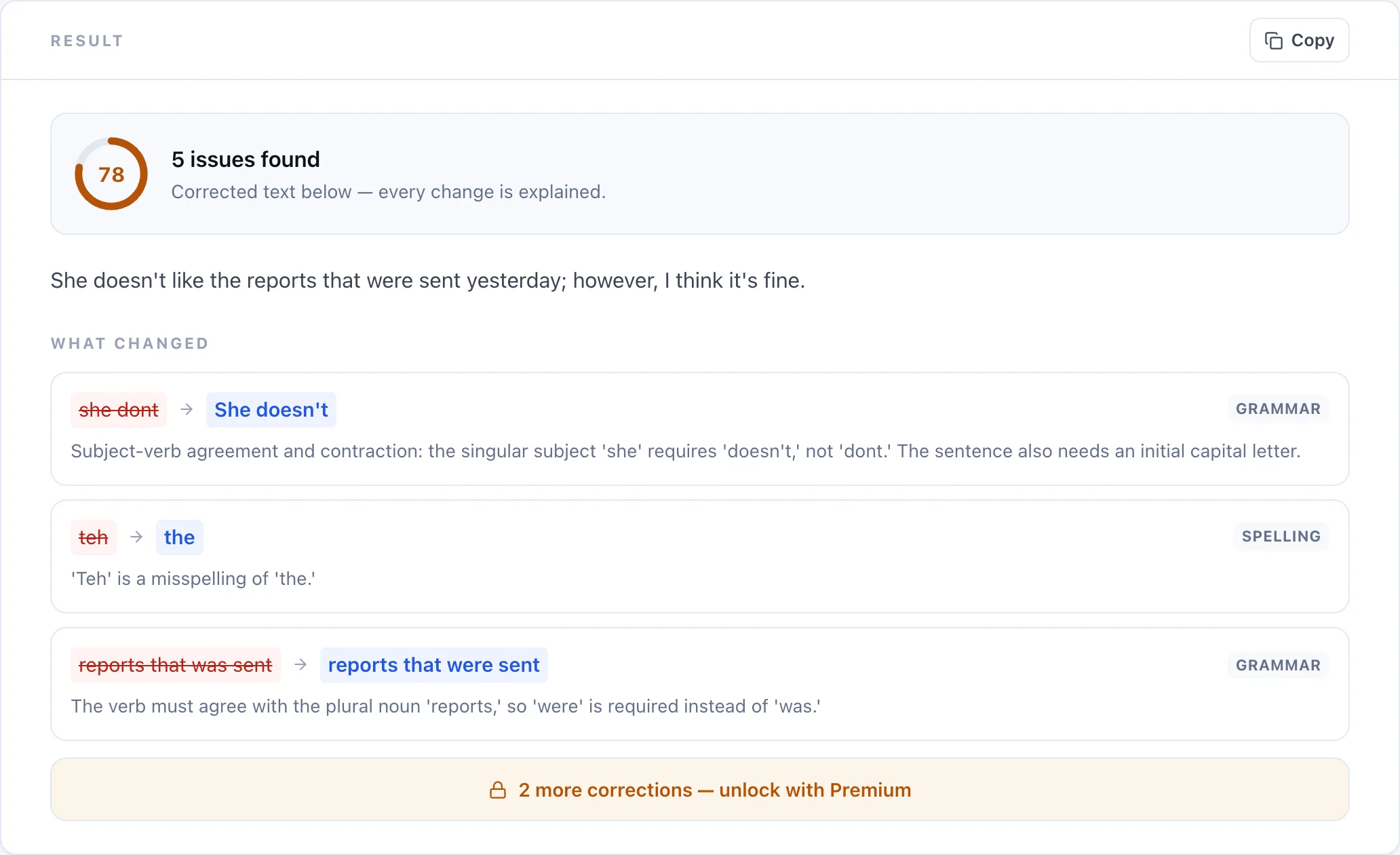
Five errors in fourteen words
Your brief
she dont like teh reports that was sent yesterday, however i think its fine
Auto-detect language · score 72
Corrected
She doesn't like the reports that were sent yesterday. However, I think it's fine. • she → She — a sentence begins with a capital letter • dont → doesn't — singular subject takes "does not", and the contraction needs an apostrophe • teh → the — misspelling • was → were — the verb refers to the plural "reports" • its → it's — contraction of "it is" takes an apostrophe
Comparison
Grammar checker vs. spellcheck vs. proofreader
| This tool | Word spellcheck | Human proofreader | |
|---|---|---|---|
| Catches misspellings | |||
| Catches real-word errors (their/there) | |||
| Subject–verb agreement | Sometimes | ||
| Explains why | |||
| Scores the draft | |||
| Understands your intent | |||
| Instant | |||
| Free |
Pricing
What is free, and what is not
Free
- The complete corrected text
- Your writing score
- The first three corrections explained
- 18 languages
- A few checks a day as a guest
Premium
- Every correction explained
- Much longer inputs
- The highest daily limit
- Premium options across all tools
More
Other free writing tools
Frequently asked questions
Is this grammar checker free?
Yes. You get the complete corrected text and your writing score for free, with the first three corrections explained. Premium unlocks every explanation and much longer inputs.
Will it change my writing style?
No. It makes the smallest correction that fixes each error. Sentence structure, word choice and tone stay yours. If you want the phrasing improved, use the Paraphraser instead.
What does the score mean?
It rates the text you submitted, before corrections — so it measures how much work the draft needed. Above 90 is clean; below 50 usually means rewriting beats patching.
What errors does it catch that Word does not?
Real-word errors like their/there and its/it's, subject–verb agreement, tense inconsistency, misplaced modifiers and comma splices. These are the mistakes where every word is spelled correctly, which is exactly why a spellchecker misses them.
Does it work in languages other than English?
Yes, twelve including Spanish, French, German, Portuguese, Hindi, Arabic, Japanese and Chinese. Auto-detect handles it, or set the language explicitly.
How long can my text be?
Free users can check a few thousand characters at a time. Premium accepts much longer documents. The minimum is three words.
Is it as good as a human proofreader?
No, and it is worth being honest about that. It reliably catches mechanical errors, but it does not know what you meant to say. For anything high-stakes — a dissertation, a contract, a book — a human still catches things no tool will.
Can I use it for academic work?
Yes. Correcting your own grammar is not academic misconduct in any policy we are aware of — it is proofreading. Rewriting someone else's text, or passing off generated content as your own, is a different matter.
Do you store what I paste in?
No. We do not store your text or the corrections we generate — only anonymous counts, to enforce daily limits.
Why did it flag something that looks correct?
Usually register or regional variation — British and American conventions differ on punctuation and spelling. Set the language explicitly rather than leaving it on auto and the flag usually goes away.