An AI humanizer rewrites machine-generated text so it reads the way a person writes — varied sentence lengths, contractions, natural transitions, and none of the flat evenness that makes generated prose recognisable.
- 20
- Word minimum
- 12
- Languages
- ~5s
- Typical rewrite
- $0
- To start
The basics
What is an AI humanizer?
It is a rewriter tuned for one specific problem: text that is grammatically perfect and completely lifeless. Language models produce prose with a very particular signature, and once you can see it you cannot unsee it.
The humanizer targets that signature. It keeps every fact and argument, and changes rhythm, register and phrasing — the things that make writing sound like it came from a person with opinions rather than a model averaging its training data.
Diagnosis
The tells it removes
Uniform sentence length
The clearest giveaway by far. Human writing lurches — a twenty-eight-word sentence, then a four-word one. Generated text tends to sit at fifteen to twenty words for paragraph after paragraph, and that evenness is what makes it feel synthetic even when every sentence is fine.
Stock transitions
Moreover. Furthermore. In conclusion. Additionally. Nobody writes an email that way.
No contractions
"It is", "do not", "cannot" throughout. People write "it's" and "don't".
Announced structure
"In this article, we will explore…" Human writers just start.
Over-qualification
Multiple hedging adjectives per sentence: "significant", "comprehensive", "robust", "various".
Symmetrical paragraphs
Every paragraph the same length, every one with three sentences.
Getting started
How to humanize AI text
Paste at least 20 words
The minimum is real, not arbitrary. Humanizing works on variation across sentences, and below about twenty words there are not enough sentences for a pattern to exist.
Choose the language
Auto-detect is fine. It rewrites in the language you wrote in — it does not translate.
Read the change list
The result lists what it altered. Not every change will suit your context, and you are the one who knows the context.
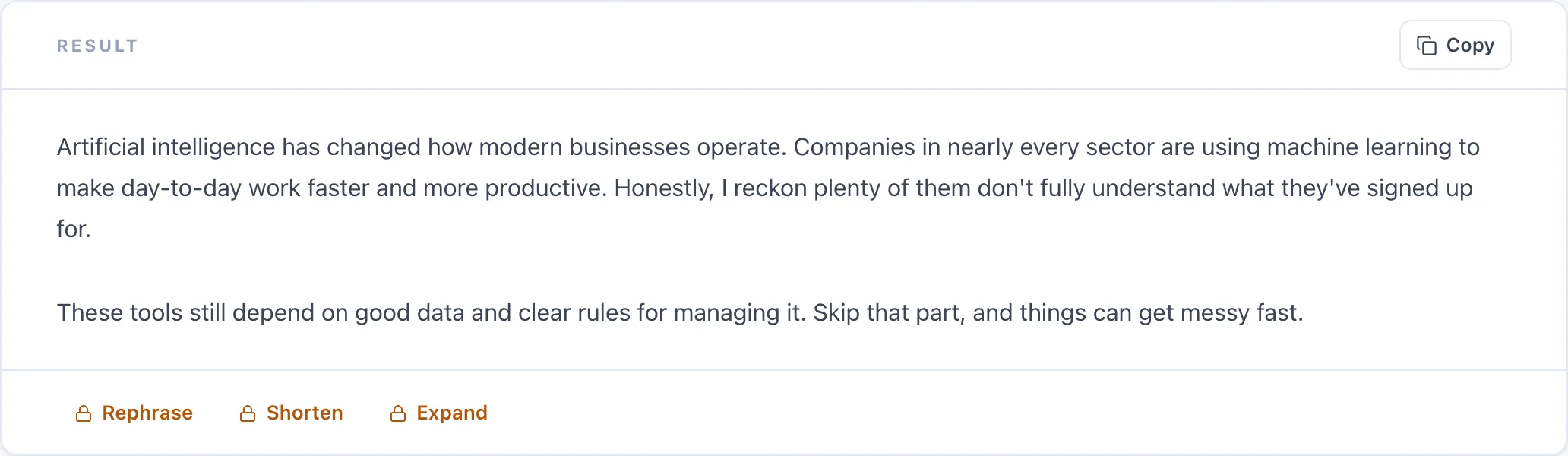
Proof
Before and after
Classic generated paragraph
Your brief
Furthermore, the quarterly analysis demonstrates significant improvement across all key performance indicators. Moreover, stakeholder engagement has increased substantially. In conclusion, these results validate our strategic direction.
Humanize · auto-detect
Rewritten
The quarterly analysis shows clear improvement across every key performance indicator. Stakeholder engagement has also risen noticeably. Taken together, the results support the strategic direction we're pursuing. Changes made: • Replaced "Furthermore" and "Moreover" with direct phrasing • "demonstrates significant improvement" → "shows clear improvement" • "increased substantially" → "risen noticeably" • Replaced the announced conclusion with a direct closing • Added a contraction in "we're pursuing"
Honesty
About AI detection
What we will say is narrower and true: this rewrites the statistical patterns that make text read as machine-written. Detectors look for some of those patterns, so scores often move. That is a side effect, not a promise.
And the honest caveat: if you are submitting work for academic credit, humanizing generated text to evade detection is misconduct at every institution we know of. The tool exists to make your own drafting read better — not to help you misrepresent authorship. Use the AI Detector to see which sentences read as machine-written, then decide what to rewrite.
Craft
Doing it yourself, in four edits
You do not need a tool for this. If you have five minutes, these four passes do most of the work:
| The edit | Why it works | |
|---|---|---|
| 1 | Rewrite the opening sentence in your own words | It is what the reader judges first, and the easiest line to make yours |
| 2 | Break one long sentence in two, and join two short ones | Kills the uniform rhythm, which is the loudest tell |
| 3 | Delete every "moreover", "furthermore", "in conclusion" | Almost never needed; the logic survives without them |
| 4 | Cut one adjective per paragraph | Generated writing over-qualifies more than any other habit |
Pricing
What is free, and what is not
Free
- Complete, full-length rewrites
- The list of changes made
- 18 languages
- A few rewrites a day as a guest
Premium
- Much longer passages
- The highest daily limit
- Humanize mode inside the Paraphraser
- Premium options across all tools
More
Other free writing tools
Frequently asked questions
Is this AI humanizer free?
Yes. Free results are complete, full-length rewrites with the change list included. Premium accepts much longer passages and raises the daily limit.
Will it make my text undetectable by AI detectors?
We will not promise that, and be sceptical of tools that do. It rewrites the patterns that make text read as machine-written, and detector scores often move as a result — but detectors change constantly and disagree with each other, so no permanent guarantee is honest.
Is using a humanizer cheating?
It depends entirely on context. Polishing your own draft is ordinary editing. Humanizing generated text to pass it off as your own work for academic credit is misconduct at essentially every institution. The tool does not know which you are doing — you do.
Why does it need at least 20 words?
Humanizing works on variation across sentences — rhythm, length, transitions. Below about twenty words there are not enough sentences for those patterns to exist, so there is nothing meaningful to change.
Will it change my meaning?
No. Every fact, figure and argument survives. What changes is rhythm, register and phrasing. The change list shows you exactly what moved.
How is this different from the Paraphraser?
They share an engine. The Paraphraser offers nine modes for general rewriting; this page is tuned specifically for the AI signature in longer generated passages. Premium users also get Humanize as a mode inside the Paraphraser.
Does it work in other languages?
Yes, twelve. It rewrites in the language you wrote in rather than translating.
Can I humanize an entire article at once?
Free users can process a few thousand characters per request; Premium accepts much longer. For a long article, working section by section also gives you better control over the result.
Do you store the text I paste in?
No. We do not store your input or the rewrites we generate — only anonymous counts, to enforce daily limits.
Should I still read the result?
Always. The tool changes register and rhythm without knowing your context, so some choices will not suit your audience. The change list exists precisely so you can review rather than accept blindly.